Documentation
Docs
L9 is still under active development and hasn't had a first release yet. This page describes the app as it currently behaves and will keep growing as things settle.
Installing
L9 isn't on F-Droid yet. For now, build it from source:
git clone https://git.sr.ht/~timofurrer/l9
cd l9
./gradlew installDebug
You'll need a JDK (17 or 21 — newer JDKs aren't yet supported by the Android build tools) and the Android SDK with platform-tools installed. The app currently targets Android 14 (API 34).
Once installed, set L9 as your home app from Android's home app settings, or:
adb shell am start -a android.settings.HOME_SETTINGSScreenshots
Taken straight from a Dumber Mini, unedited.
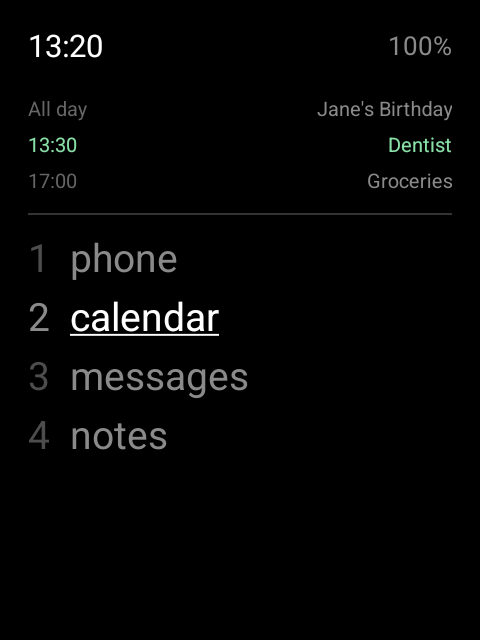
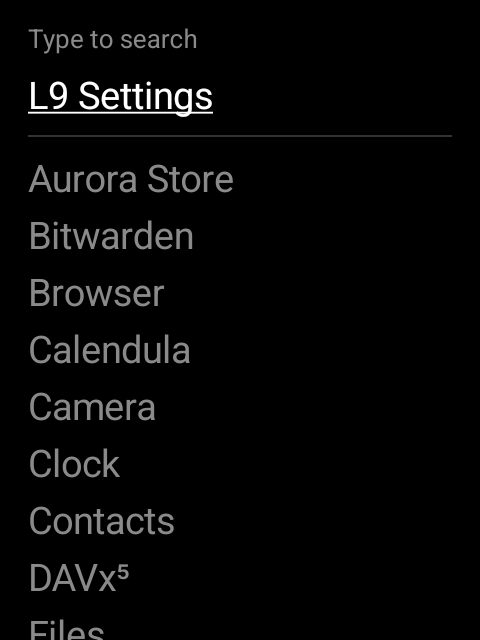
0), with search and Settings at the top.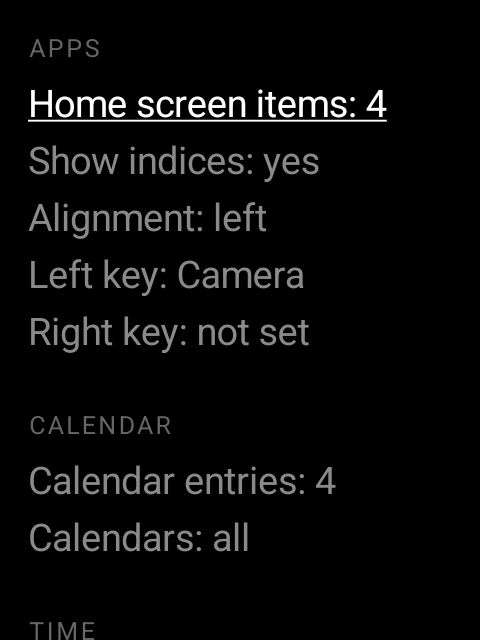
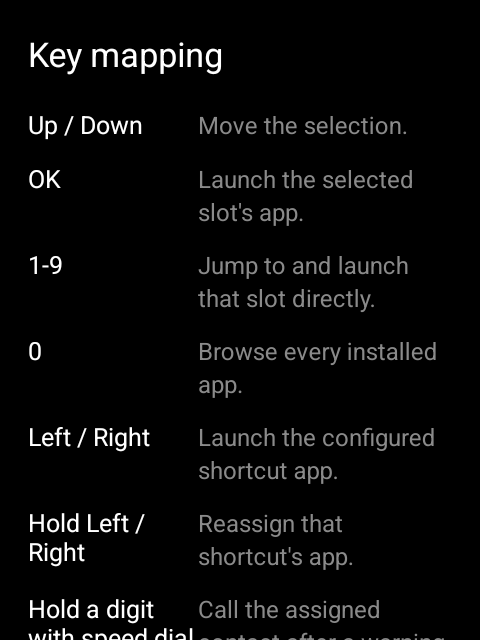
Keypad reference
Every action in L9 lives on a physical key. There is no touch UI to fall back on.
| Key | Press | Hold |
|---|---|---|
| Up / Down | Move the selection | — |
| OK | Launch the selected slot's app | — |
| 1–9 | Jump to and launch that slot directly | — |
| 0 | Browse every installed app | — |
| Left / Right | Launch the assigned shortcut | Reassign the shortcut |
| Digit with speed dial set | Normal digit behavior | Call the assigned contact, after a warning |
| * | Nothing on its own — it's a prefix for the rows below | Open Settings |
| * then # | Toggle reorder mode — Up/Down then swaps the selected slot with its neighbor, * or Back drops it back in place | — |
| * then 0 | (Re)assign the app for the selected slot | — |
| * twice | Rename the selected slot | — |
| Back | Cancel the current screen, or exit reorder mode | — |
Settings
Reached by holding *. Grouped into sections — all reachable by keypad, none requiring touch. Up/Down moves between rows, Left/Right adjusts a value, OK opens a row that leads somewhere else.
- Apps
- How many home-screen slots to show, whether to display index numbers, list alignment, and which apps the left and right keys open.
- Calendar
- How many upcoming entries to show, and which calendars to include.
- Time
- 12-hour or 24-hour clock.
- Notifications
- Notification access status, used to drive the single notification dot.
- Speed dial
- Assign a contact to any digit 0–9 for hold-to-call.
- Theme
- Whether to show a divider line under the calendar, and an option to set your lock screen and home screen wallpapers to solid black.
- Backup
- Export all settings to a JSON file, or import one to replace your current settings.
- Manual
- The in-app intro, full keypad reference, and version/license info — the same material as this docs page, without leaving the launcher.
Frequently asked
Which phones does this work on?
Officially supported on the Dumber Mini — that's the only device it's actually tested on.
L9 doesn't use any device-specific code — it relies on standard Android d-pad and numeric key codes, so it should also work on other Android phones with a physical keypad and/or d-pad. Untested there, so expect rough edges.
Does it need Google Play or any Google services?
No. L9 has zero dependencies, including no Google Play Services, and requests no network permission.
Can I use it on a touchscreen too?
L9 is designed around physical keys first. It hasn't been tuned for touch input, and touch isn't the primary way it's meant to be used.
Why isn't it on F-Droid yet?
It's pre-release and still being tested on real hardware. F-Droid publishing is planned once the app is stable.
What license is L9 under?
GPLv3. The full text is in the LICENSE file in the source repository.